
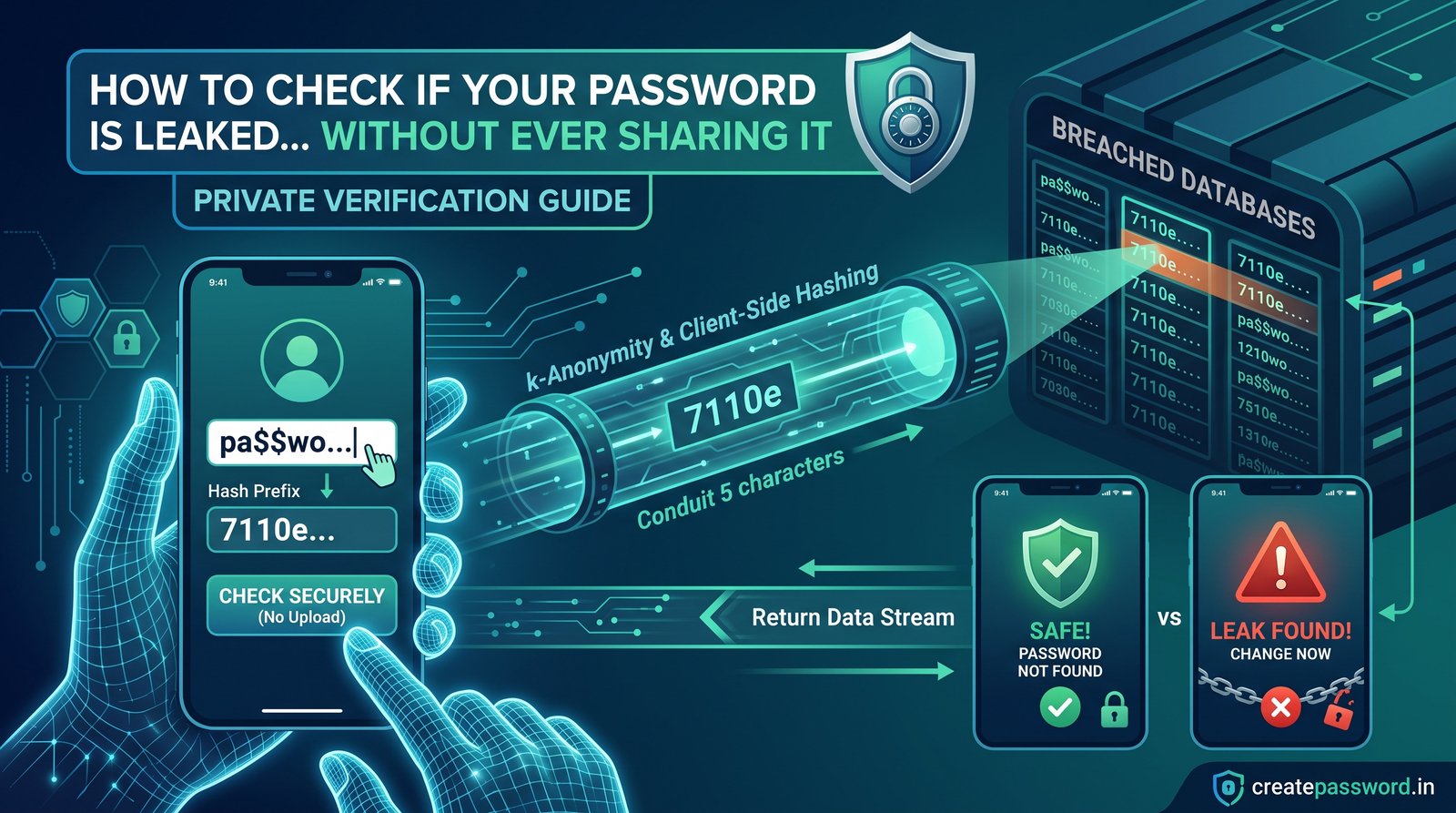
To check if a password is leaked without sharing it, hash it on your own device and send only the first five characters of that hash. That is a k-anonymity password check. The breach service never sees the password, and your browser finishes the match locally.
People ask the same question in two forms: has my password been compromised, and will the website I use to find out steal it? Both worries are fair. Breach lists are real. So are lookalike checkers that ask you to paste a password into a form that quietly uploads it.
This guide explains a secure password checker you can audit yourself. It covers what a leak check can and cannot prove, how a client-side hash check works, and how to run a secure leaked password test on this site without the password leaving your browser.
In this guide:
- What “leaked” means, and what a dark web password scan usually is not
- Why typing a password into a random checker is the wrong test
- How k-anonymity and a 5-character hash prefix protect you
- A step-by-step check you can verify in your browser’s Network tab
- What to do when a password is found, and what “not found” does not mean
What a Leaked Password Actually Is
A password is leaked when it appears in a dump from a breached service, a malware log, or a phishing kit, and that dump later circulates. Researchers and services such as Have I Been Pwned (HIBP) Pwned Passwords collect those dumps, hash each password, and publish the hashes so people can search without a new copy of the plaintext list.
A safe password checker does not need your email, your name, or the site you use the password on. It only answers one narrow question: has this exact string shown up in the breach corpus being queried?
That is different from an account-breach notice (“your email was in the X dump”). An email can be in a breach while the password you use today is new. A password can be in a breach even if your email was never published. Check both, but do not treat them as the same test.
Why a Random “Dark Web Password Scan” Is the Wrong Tool
Search results for a dark web password scan are full of pages that ask you to type the password, or your email plus the password, into a box. Some of those pages are ads. Some store what you submit. A few are the phishing page.
A real-time crawl of hidden forums is also not what most of those pages do. They cannot show you a live hidden-service thread in the few seconds a form takes to reply. What a serious check can do is compare your password, privately, with a maintained list of passwords already seen in breaches.
Use a checker only if it states all three of these:
- The password is hashed in your browser (a client-side hash check).
- Only a short hash prefix is sent (k-anonymity).
- You can see that request in DevTools, and it does not contain the password.
If the page will not say where the password goes, do not type it there.
How to Check If a Password Is Leaked Without Sharing It
The method below is the one this site’s Password Breach Checker uses. It calls the HIBP Pwned Passwords range API. SHA-1 is computed locally with the Web Crypto API. Only the first five hexadecimal characters of that hash are requested. The rest of the hash is compared on your device.
Step 1: Open a checker that states the method
Go to the breach checker. The page should say that the password stays in the browser and that the lookup uses k-anonymity. Read that note before you type anything. The same idea is covered in the breach checker tutorial and on the security methodology page.
Step 2: Type the password locally
Enter the password in the field on your device. Use the show/hide control if you need to confirm what you typed. Nothing is sent when you type. The check starts only when you submit.
Step 3: Let the browser hash it
The page computes a SHA-1 hash of the exact string you entered, including capitals, spaces, and symbols. SHA-1 is used here because that is the hash HIBP publishes for this API, not because it is a good way to store passwords. Your password manager and your accounts should still use modern password hashing. This hash exists only for the lookup.
Step 4: Send five characters, not the password
Suppose the hash begins with 7110E. The browser requests https://api.pwnedpasswords.com/range/7110E. That prefix is shared by a large set of unrelated hashes. HIBP cannot tell which password you typed from those five characters alone. This site also sends the Add-Padding header so the size of the reply is less revealing.
Step 5: Match the suffix on your device
The response is a list of hash suffixes and how many times each has been seen. Your browser looks for the remaining 35 characters of your hash. If it finds a line, the count is how often that password appears in the corpus. If it does not, the result is “not found” for this list. The full hash is never uploaded.
Step 6: Confirm it yourself
Open DevTools (F12), choose Network, and run the check again. You should see one request to api.pwnedpasswords.com/range/ followed by five characters. You should not see your password in the URL, the headers, or the response. If you do, stop and use a different tool. The privacy notice describes this data flow in plain language.
What k-Anonymity Means in a Password Check
k-anonymity is a privacy idea from data publishing: a record should be indistinguishable from at least k other records. In a k-anonymity password check, the “record” you reveal is the 5-character prefix. Everyone whose hash starts with the same five characters looks the same to the server.
Troy Hunt documented this model for Pwned Passwords so a lookup does not require sending the password or the full hash. The server returns every suffix in that bucket. Your device is the only place that knows which suffix, if any, is yours.
Five characters is a tradeoff, not magic. It is short enough that many hashes share a bucket, and long enough that the download stays practical. It is not zero knowledge in the cryptographic sense. A network observer sees that you asked about one prefix. They do not see the password. On a shared or monitored network, that is still less exposure than sending the password itself.
Safe Check vs Unsafe Check
| What you do | What leaves your device | Use it? |
|---|---|---|
| Client-side hash, 5-character prefix, local suffix match | Hash prefix only | Yes, and verify in Network tab |
| Paste the password into a form that posts to a server | The password | No |
| “Dark web scan” that wants email and password together | Identity plus secret | No |
| Email-only breach search (HIBP email API or similar) | The email address | Useful for a different question; it does not test the password |
| Local strength meter | Nothing, if it is truly local | Yes, but it does not prove the password is unexposed |
If the Password Was Found
A count above zero means that exact string is already in attacker wordlists. Change it. Do not “add a 1” or swap a letter. Attackers try those variants first.
- Change the password on the account you care about most first: email, then banking, then work.
- If you reused it, change every other account that shared it. Reuse is how one leak becomes many.
- Create a new secret with the password generator or a passphrase generator. Aim for a unique, random value, not a clever pattern.
- Check length and guessability with the strength checker. Strength is not the same as “not in a breach,” but a short password fails both tests faster.
- Turn on multi-factor authentication where the service offers it.
- Store the new password in a password manager so you are not tempted to reuse the old one.
A high count means the string is common, not that someone is inside your account right now. Still change it. Common passwords are the first ones tried.
If the Checker Says Not Found
Not found is not a safety certificate. It means this exact string was not in the corpus behind that API at the time you asked. Gaps are normal:
- New breaches take time to be added, and some never are.
- A password can be weak and still absent from the list.
Summer2026!can be guessable before it is famous. - A small change (an extra space, a different capital) is a different hash. The original may still be leaked.
- The check says nothing about phishing, session theft, or malware on your device.
Treat “not found” as one input. Uniqueness, length, and a second factor still matter. The complete guide to strong passwords covers how to choose the replacement.
What This Check Does Not Do
Honesty matters more than a dramatic scan result. This method does not:
- Browse the dark web, Telegram channels, or private stealer logs in real time.
- Tell you which company was breached, or whether your email was in that breach.
- See passwords saved in your browser or password manager. You check one string at a time.
- Prove an account is safe. A leaked password that you already changed is a closed issue. An unleaked password on a phished site is not.
- Replace monitoring you set up with the account provider, such as Google or your bank’s own alerts.
For email exposure, use a service that is explicit about searching an email address, and expect to confirm you own that inbox. Do not hand over the password to “unlock” the report.
A Practical Audit for Remote Work and IT
Everyday users and remote workers can run the same check. The difference is scope, not the cryptography.
- Personal: check the password for email, your primary bank, and any password you know you reused. Then stop reusing.
- Work device: do not paste a corporate password into a tool your employer has not approved, even a k-anonymity one, if policy forbids it. Ask security which checker is allowed. The method in this guide is still the standard to ask for.
- IT teams: block password paste into unknown domains, prefer a range-API check over any vendor that wants the plaintext, and do not log the password or the full hash in analytics. This site’s checker is built not to put the password in the URL.
After you retire a leaked password, generate the replacement locally. The create-password tool and the homepage generator run in the browser as well.
References
- Have I Been Pwned, Pwned Passwords — the range API this checker calls
- Troy Hunt, Pwned Passwords v2 and k-anonymity
- NIST SP 800-63B, Digital Identity Guidelines
- OWASP Authentication Cheat Sheet
Author: Venkateswara Rao, Founder, Createpassword.in. LinkedIn.
Resources & Tools
Home Page
- Password Generator — https://createpassword.in/
Tutorials
- Security Documentation — https://createpassword.in/tutorials
- Breach Checker Tutorial — https://createpassword.in/tools/breach-checker
Password Tools
- Password Breach Checker — https://createpassword.in/tools/breach-checker
- Password Generator — https://createpassword.in/create-password
- Password Generator — https://createpassword.in/tools/password-generator
- Password Strength Checker — https://createpassword.in/tools/password-strength
- Passphrase Generator — https://createpassword.in/tools/passphrase-generator
Articles That Will Help You to Understand to Make Strong Passwords to Secure for Your Online Accounts
- The Ultimate Guide to Using a Password Generator Free — https://createpassword.in/blog/password-generator-free
- Passphrase vs Password — https://createpassword.in/blog/passphrase-vs-password
- Complete Guide to Creating Strong Password — https://createpassword.in/blog/complete-guide-strong-passwords-2026
- Passphrase vs Password: Which Is Better for Security — https://createpassword.in/blog/passphrase-vs-password-security
- 12 Character Password Generator: Free, Secure & Instant Tool — https://createpassword.in/blog/secure-12-character-password-generator
Leave a comment
Comments are moderated before appearing. Please keep it respectful and on-topic. Your email is required for verification but is never displayed publicly or shared.